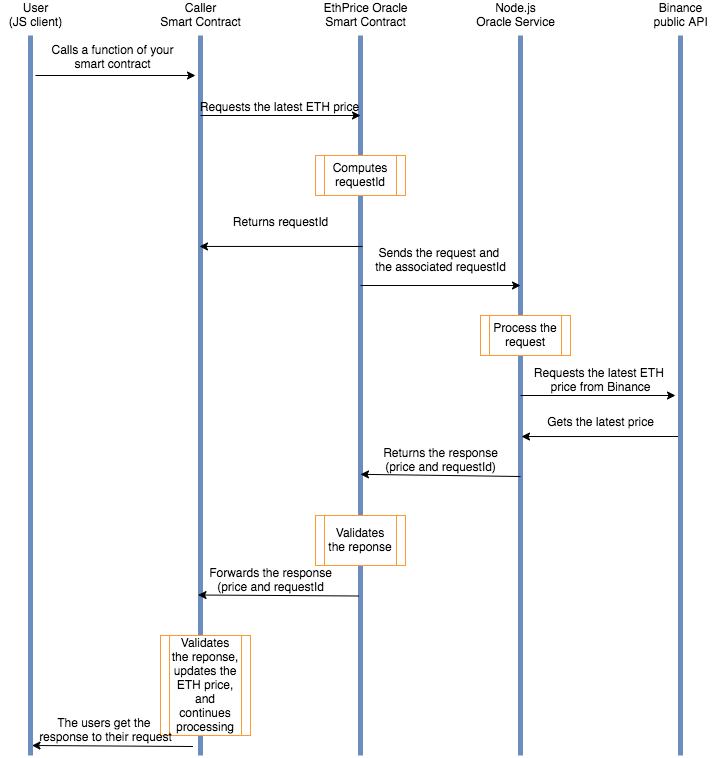
Now, let's suppose you're building a DeFi dapp, and want to give your users the ability to withdraw ETH worth a certain amount of USD. To fulfill this request, your smart contract (for simplicity's sake we'll call it the "caller contract" from here onwards) must know how much one Ether is worth.
And here's the thing: a JavaScript application can easily fetch this kind of information, making requests to the Binance public API (or any other service that publicly provides a price feed). But, a smart contract can't directly access data from the outside world. Instead, it relies on an oracle to pull the data.
Phew! At first glance, this sounds like a complicated thing to do 🤯. But, by taking it one step at a time, we'll set you on a smooth sail.
Now I know that a picture is sometimes worth a thousand words, so here's a simple diagram that explains how this works:
Let this sink in before you read on.
For now, let's initialize your new project.
Fire up a terminal window and move into your projects directory. Then, create a directory called EthPriceOracle and cd into it.
In the box to the right, initialize your new project by running the npm init -y command.
Next, let's install the following dependencies: truffle (npm install -g [email protected]), openzeppelin-solidity (replace by @openzeppelin/contracts), loom-js, loom-truffle-provider (replace by [email protected]), bn.js, and axios.
Note : en cas d’erreur lors de l’installation de truffle “erreur Python .... “
npm install --global windows-build-tools
npm install --global truffle
Why do you need all these packages you ask? Read on and things will become clearer.
You'll be using Truffle to compile and deploy your smart contracts to Loom Testnet so we've gone ahead and created two bare-bones Truffle projects:
oracle directory:mkdir oracle && cd oracle && npx truffle init && cd ..
✔ Preparing to download box
✔ Downloading
✔ cleaning up temporary files
✔ Setting up box
caller directory:mkdir caller && cd caller && npx truffle init && cd ..
✔ Preparing to download box
✔ Downloading
✔ cleaning up temporary files
✔ Setting up box
We trust you to do the same and, if everything goes well, your directory structure should look something like the following:
tree -L 2 -I node_modules
.
├── caller
│   ├── contracts
│   ├── migrations
│   ├── test
│   └── truffle-config.js
├── oracle
│   ├── contracts
│   ├── migrations
│   ├── test
│   └── truffle-config.js
└── package.json
Now, instead of jumping directly to the oracle smart contract, we'll continue by looking into the caller smart contract. This is to help you understand the process from start to finish.
One of the things the caller smart contract does is to interact with the oracle. Let's see how you can do this.
For the caller smart contract to interact with the oracle, you must provide it with the following bits of information:
I reckon that the simplest approach would be to just hardcode the address of the oracle smart contract.
But let’s put on our blockchain developer hat🎩and try to figure out if this is what we want to do.
The answer has to do with how the blockchains work. Meaning that, once a contract is deployed, there's no way you can update it. As the natives call it, contracts are immutable.
If you think about it, you'll see that there are plenty of cases in which you would want to update the address of the oracle. As an example, say there's a bug and the oracle gets redeployed. What then? You'll have to redeploy everything. And update your front-end.
Yeah, this is costly, time-consuming, and it harms the user experience😣.
So the way you'd want to go about this is to write a simple function that saves the address of the oracle smart contract in a variable. Then, it instantiates the oracle smart contract so your contract can call its functions at any time.
In the box to the right, we've pasted an empty shell for the caller contract.
address named oracleAddress. Make it private, and don't assign it to anything.setOracleInstanceAddress. This function takes an address argument named _oracleInstanceAddress. It's a public function, and it doesn't return anything.oracleAddress to _oracleInstanceAddress.// create a file CallerContract.sol inside /caller/contracts folder
pragma solidity 0.5.0;
contract CallerContract {
address private oracleAddress;
function setOracleInstanceAddress(address _oracleInstanceAddress) public {
oracleAddress = _oracleInstanceAddress;
}
}
Awesome! Now that you've saved the address of the oracle into a variable, let's learn about how you can call a function from a different contract.
For the caller contract to interact with the oracle, you must first define something called an interface.
Interfaces are somehow similar to contracts, but they only declare functions. In other words, an interface can't:
You can think of an interface as of an ABI. Since they're used to allow different contracts to interact with each other, all functions must be external
Let's look at a simple example. Suppose there's a contract called FastFood that looks something like the following:
pragma solidity 0.5.0;

contract FastFood {
  function makeSandwich(string calldata _fillingA, string calldata _fillingB) external {
//Make the sandwich
  }
}
This very simple contract implements a function that "makes" a sandwich. If you know the address of the FastFood contract and the signature of the makeSandwich, then you can call it.
Note: A function signature comprises the function name, the list of the parameters, and the return value(s).
Continuing with our example, let's say you want to write a contract called PrepareLunch that calls the makeSandwich function, passing the list of ingredients such as "sliced ham" and "pickled veggies". I'm not hungry but this sounds tempting😄.
To make it so that the PrepareLunch smart contract can call the makeSandwich function, you must follow the following steps:
Define the interface of the FastFood contract by pasting the following snippet into a file called FastFoodInterface.sol:
pragma solidity 0.5.0;

interface FastFoodInterface {
   function makeSandwich(string calldata _fillingA, string calldata _fillingB) external;
}
Next, you must import the contents of the ./FastFoodInterface.sol file into the PrepareLaunch contract.
Lastly, you must instantiate the FastFood contract using the interface:
fastFoodInstance = FastFoodInterface(_address);
At this point, the PrepareLunch smart contract can call the makeSandwich function of the FastFood smart contract:
fastFoodInstance.makeSandwich("sliced ham", "pickled veggies");
Putting it together, here's how the PrepareLunch contract would look like:
pragma solidity 0.5.0;
import "./FastFoodInterface.sol";

contract PrepareLunch {

  FastFoodInterface private fastFoodInstance;

  function instantiateFastFoodContract (address _address) public {
    fastFoodInstance = FastFoodInterface(_address);
    fastFoodInstance.makeSandwich("sliced ham", "pickled veggies");
  }
}
Now, let's use the above example for inspiration as you set up the caller contract to execute the updateEthPrice function from the oracle smart contract.
We've gone ahead and created a new file called caller/EthPriceOracleInterface.sol and placed it into a new tab. Give it a read-through. Then, let's focus back on the caller/CallerContract.sol tab.
pragma, import the ./EthPriceOracleInterface.sol file.EthPriceOracleInterface variable named oracleInstance. Place it above the line of code that declares the oracleAddress variable. Let's make it private.setOracleInstanceAddress function. Instantiate the EthPriceOracle contract using EthPriceOracleInterface and store the result in the oracleInstance variable. If you can't remember the syntax for doing this, check the example from above. But first, try to do it without peeking.// create a file EthPriceOracleInterface.sol
pragma solidity 0.5.0;
contract EthPriceOracleInterface {
function getLatestEthPrice() public returns (uint256);
}
// Callercontrat.sol
pragma solidity 0.5.0;
import "./EthPriceOracleInterface.sol";
contract CallerContract {
EthPriceOracleInterface private oracleInstance;
address private oracleAddress;
function setOracleInstanceAddress (address _oracleInstanceAddress) public {
oracleAddress = _oracleInstanceAddress;
oracleInstance = EthPriceOracleInterface(oracleAddress);
}
}
Oops! By now, you probably know enough about Solidity to figure out that there's a security hole in this code🤯. In the next chapter, we'll explain how to make the setOracleInstanceAddress function safe.
Did you manage to identify the security issue in the previous chapter?
If not, let me help you with the answer: when you're writing a public function, anyone could execute it... and set the oracle's address to whatever they want.
But how can you fix that?
Here's the solution: you must use something called a modifier. A modifier is a piece of code that changes the behavior of a function. As an example, you can check that a particular condition is met before the actual function gets executed.
So, fixing this security hole requires you to follow the following steps:
Ownable smart contract. We've covered OpenZepellin in our previous lessons, just go back and refresh your memory if need be.Ownable.setOracleInstanceAddress function so that it uses the onlyOwner modifier.Here's how using a modifier looks like:
contract MyContract {
  function doSomething public onlyMe {
// do something
  }
}
In this example, the onlyMe modifier is executed first, before the code inside the doSomething function.
Pretty easy! Now it's your turn to put it in practice😉.
import the contents of "openzeppelin-solidity/contracts/ownership/Ownable.sol"
Ownable, you must append is Ownable to its definition as follows:onlyOwner modifier's name at the end of the setOracleInstanceAddress function definition.newOracleAddressEvent. The last line of the setOracleInstanceAddress function should emit newOracleAddressEvent. Pass it oracleAddress as an argument.pragma solidity 0.5.0;
import "./EthPriceOracleInterface.sol";
// add import
import "@openzeppelin/contracts/access/Ownable.sol";
// add is Ownable
contract CallerContract is Ownable{
EthPriceOracleInterface private oracleInstance;
address private oracleAddress;
// add event
event newOracleAddressEvent(address oracleAddress);
function setOracleInstanceAddress (address _oracleInstanceAddress) public onlyOwner {
oracleAddress = _oracleInstanceAddress;
oracleInstance = EthPriceOracleInterface(oracleAddress);
// add event emitter
emit newOracleAddressEvent(oracleAddress);
}
}
Great, you've finished off the setOracleInstanceAddress function!
Now, your front-end can call it to set the address of the oracle.
Next, let's look into how the ETH price gets updated.
To initiate an ETH price update, the smart contract should call the getLatestEthPrice function of the oracle. Now, due to its asynchronous nature, there's no way the getLatestEthPrice function can return this bit of information. What it does return instead, is a unique id for every request. Then, the oracle goes ahead and fetches the ETH price from the Binance API and executes a callback function exposed by the caller contract. Lastly, the callback function updates the ETH price in the caller contract.
This is a really important point, so spend a few minutes thinking about it before moving forward.
Now, does implementing this sound like a hard problem? Actually, the way this works is so easy it'll surprise you. Just bear with me for the next two chapters🤓.
Every user of your dapp can initiate an operation that'll require the caller contract to make request to update the ETH price. Since the caller has no control over when it'll get a response, you must find a way to keep track of these pending requests. Doing so, you'll be able to make sure that each call to the callback function is associated with a legit request.
To keep track of requests, you will use a mapping called myRequests. In Solidity, a mapping is basically a hash table in which all possible keys exist. But there's a catch. Initially, each value is initialized with the type's default value.
You can define a mapping using something like the following:
mapping(address => uint) public balances;
Can you guess what this snippet does? Well... as said, it sets the balance of all possible addresses to 0. Why 0? Because that's the default value for uint.
Setting the balance for msg.sender to someNewValue is as simple as:
balances[msg.sender] = someNewValue
We've gone ahead and declared the myRequests mapping for you. The key is an uint256 and the value a bool. We've also declared an event named ReceivedNewRequestIdEvent.
updateEthPrice. It doesn't take any parameters, and it should be a public function.oracleInstance.getLatestEthPrice function. Store the returned value in a uint256 called id.myRequests mapping for id to true.